
Skip to content

Services · Custom software

ERP integration services and enterprise systems integration

ERP integration connects your accounting and back-office system with your online store, your CRM, your invoicing and your company’s other tools, so each piece of data is entered only once and reaches where it’s needed on its own. From Bogotá, Colombia, we connect Odoo, custom platforms and online stores via API and webhooks, without forcing you to replace what already works for you. It’s part of our custom software service, and the integration code remains yours.

30-minute assessment, free and with no commitment · Monday to Friday, 8:00 a.m.–1:00 p.m. and 2:00–5:00 p.m.

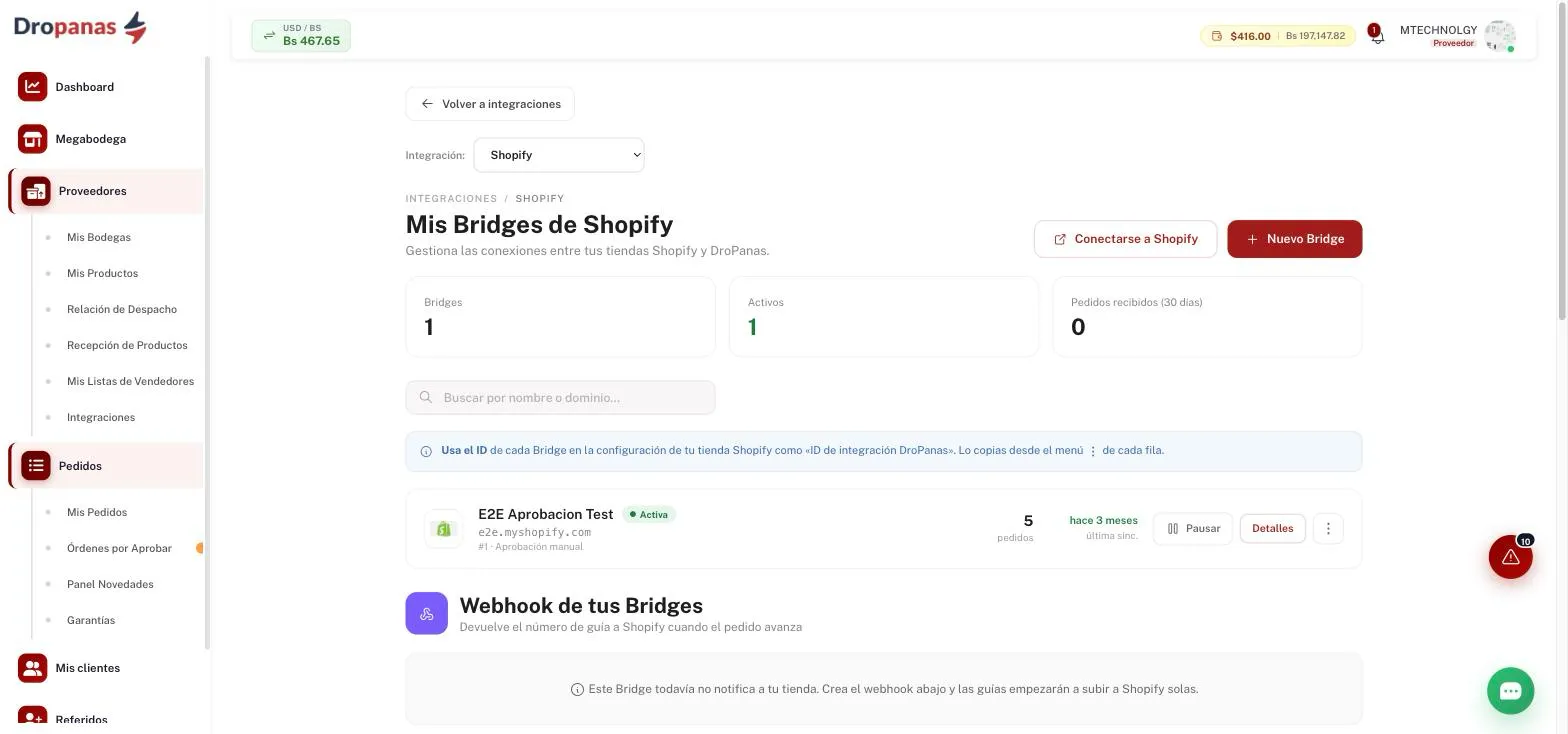
Integrations screen of the Dropanas platform, with the bridge that connects a Shopify store and the webhook that sends the tracking number back to it
What we see in the sector

When does a company need to integrate its ERP with its other systems?

When someone on your team spends a good part of the day copying data from one screen to another. It almost always shows up as one of these symptoms:

The same order is typed in two or three times

It comes in through the online store, someone enters it into the ERP to invoice it and someone else types it again to ship it. Every manual step is a possible error and one more delay.

The store’s inventory isn’t the warehouse’s

The website sells a product that’s already out of stock, or doesn’t show the one that just arrived, because stock levels get updated whenever someone remembers.

The invoice comes later, and by hand

The order was paid online, but the e-invoice is put together at the end of the day by copying the amount, the customer and the taxes from another screen.

Nobody knows which record is right

The customer has one email in the CRM, another in the ERP and another in the store. When you need to call or bill them, time is lost figuring out which one is valid.

The short answer

What is ERP integration and enterprise systems integration?

Enterprise systems integration means getting your software —ERP, online store, CRM, invoicing, logistics platform— to share information automatically, instead of having a person copy it from one to another. ERP integration is the most common case: the ERP becomes the source of truth for customers, products, prices, inventory and invoices, and the other systems read from it or write to it.

In practice, integrating means deciding three things for each piece of data: which system is in charge of it, when it travels to the other one, and what happens if the transfer fails. Those three decisions matter more than the technology used to connect them.

The honest question

Integrate your systems or replace your ERP?

Replacing an ERP is a long project: migrating the accounting, retraining the team and living with two systems in the meantime. That’s why, before proposing it, we check whether your problem can be solved by connecting what you already have.

Integrating usually makes sense if:

  • Your ERP handles your accounting and e-invoicing and the problem is that data reaches it late or by hand.
  • Your team already knows how to use it and replacing it would cost more in learning than in licenses.
  • You have an online store or your own platform that works well on its own and only needs to talk to the ERP.

And replacing it usually makes sense if your ERP can’t connect to anything —no API, no exchange files— or if it forces you to run half your operation outside it in spreadsheets. In that case, we recommend checking whether a standard ERP would work for you before thinking about custom software. We discuss it in the assessment, before proposing anything.

What we work with

Why Odoo, and what if you use another ERP?

Odoo is the ERP we have built integrations with in real projects. As a product, Odoo offers a localization for Colombia that includes e-invoicing with the DIAN, Colombia’s tax authority, and a documented external API that lets another system read and write orders, customers, products, inventory and invoices without touching its core.

If your company uses another ERP or accounting software —Siigo, Alegra and World Office, common in Colombia, SAP Business One or another— the first step is to check which connection method your version and plan offer: not every plan includes an API, and some only allow file imports. We review that in the assessment, and tell you what can and can’t be connected before quoting.

How it’s done

How are two systems connected: API, webhooks, connector or files?

There are four ways, and the right one depends on what each side allows and how fast the data needs to travel:

  • API: one system requests data from the other, or sends data to it, directly. It’s the most reliable method when both sides have one.
  • Webhooks: the system sends a notice the moment something changes —a new order, a payment, a shipment that moves forward— instead of waiting to be asked.
  • Connector or integration platform: a product that already includes a ready-made connection between two well-known systems. If one exists that covers your case, it’s usually the fastest option and we’ll tell you so.
  • File exchange: exporting and importing on a fixed schedule. It’s the last resort, for systems that offer nothing else.

We build a custom integration when the connector doesn’t exist, falls short or forces you to change your process to fit it.

What we build

What integrations we build

Each integration is designed around a specific process, not around a list of systems.

01

Online store connected to the ERP

Orders reach the ERP without anyone typing them in, and prices and stock levels flow back to the store. If the store still needs to be built or rebuilt, that’s our online stores service; if it already sells and what fails is the operation, see ecommerce software.

02

Invoices generated from the order

The paid order generates the invoice in your ERP or with your e-invoicing provider, with the customer, amounts and taxes that were already in the order.

03

Your own API for your customers, suppliers or partners

An API with per-user credentials, a test environment and webhooks, so others can integrate their systems with yours without asking your team for anything. That’s what we built on the Dropanas platform.

04

Connected logistics operation

Orders, warehouses, couriers and carriers sharing the same status for every shipment, so nobody has to call to ask. See how we approach it in logistics software.

05

Forms and CRM

Every contact that comes in through your website reaches the CRM with the service they’re interested in, so the sales conversation starts already knowing what it’s about.

06

Customer service that checks your systems

Replies on WhatsApp and other channels that read the actual status of the order or shipment before answering. That’s Soporte 360, our customer service and complaints solution.

Integrations

What systems does it connect with?

With what you already use, as long as the other side allows connections. We separate what we’ve already done from what is reviewed case by case.

ERP with integrations built

Odoo offers an external API to read and write orders, customers, products, inventory and invoices.

  • Odoo

Ecommerce

Stores and platforms we have already built on.

  • Shopify
  • WooCommerce

APIs and events

What we build when the connection doesn’t exist.

  • REST API with credentials
  • Webhooks
  • Test environment

CRM

Website forms that reach the CRM with their data.

  • Kommo
  • HubSpot

Payments

Online payment gateways we have already put to work on client websites.

  • PayU
  • Stripe

Accounting and e-invoicing: reviewed in the assessment

Among the most widely used in Colombia. What can be connected depends on the version and plan of each one.

  • Siigo
  • Alegra
  • World Office
  • SAP Business One
  • Your e-invoicing provider

Naming a system doesn’t imply a business partnership with its maker. Anything not on this list we review in the assessment before promising anything.

How we work

How do we run an integration project?

  1. 01

    30-minute assessment, free of charge

    You tell us which systems you use and where information is being copied by hand. We tell you whether an existing connector, a custom integration or a change of system is what you need.

  2. 02

    Data map

    For each piece of data —customer, product, price, stock, order, invoice— we define with your team which system is in charge of it, when it travels and what happens if it fails.

  3. 03

    Written proposal

    With scope, investment and delivery date, before we start.

  4. 04

    Build and testing

    The integration is tested in a test environment, with sample data, before it touches your operation. Every transfer between systems is logged, retried if the other side doesn’t respond, and alerts a person when something doesn’t go through.

  5. 05

    Go-live and handover

    We switch it on in stages, monitor the first transfers with your team and hand over the code and documentation. If you need it, we host it on our managed hosting and servers.

Real projects

Integrations already in operation

These are portfolio projects where integration is part of the published work.

Dropanas

Dropanas: API, webhooks and Shopify

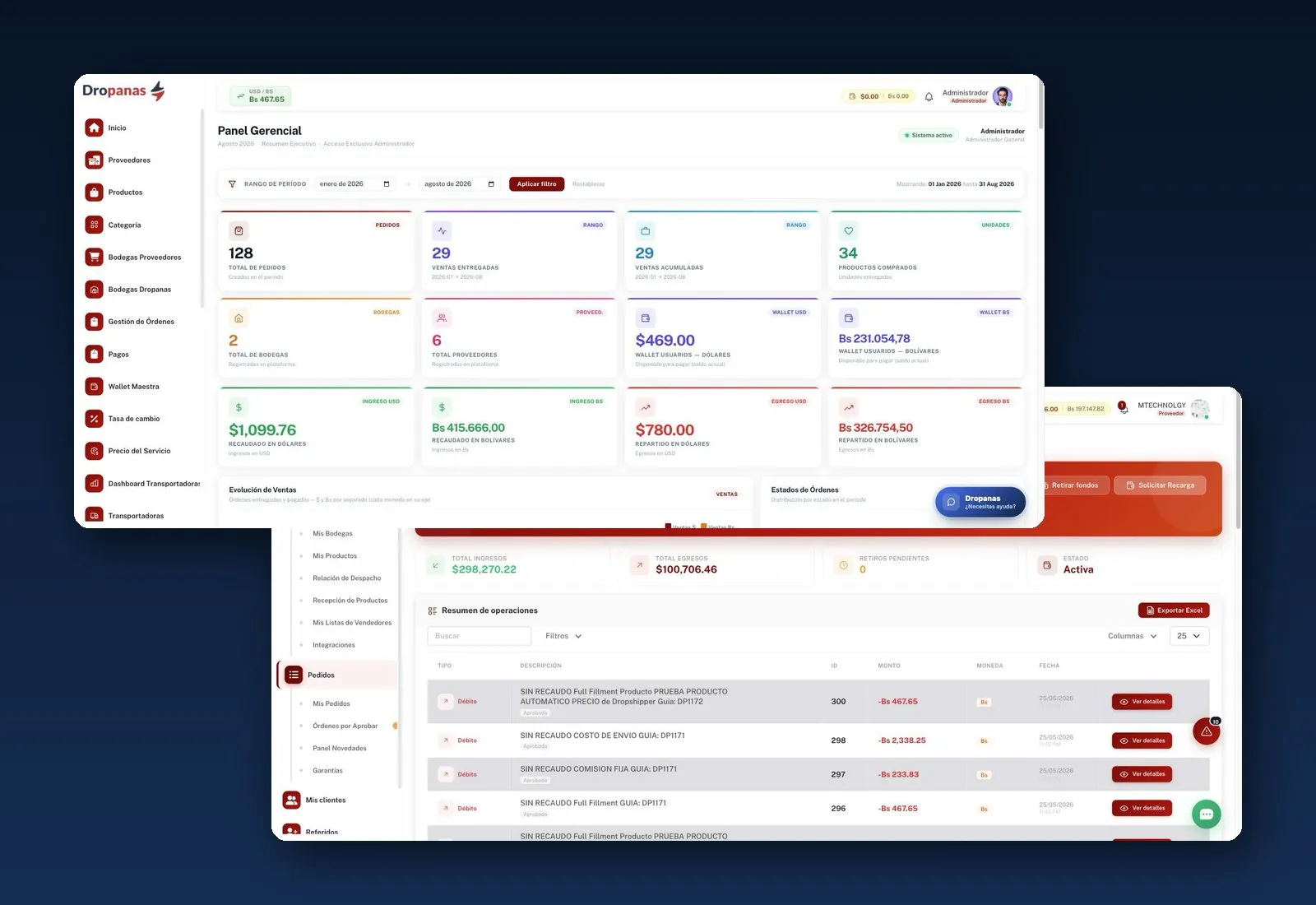
Custom platform built on Laravel 11 with a bridge for Shopify stores and a token-based REST API, test environment and webhooks, so suppliers and stores can integrate their own systems. When the exchange rate is updated, the platform automatically recalculates commissions, shipping costs and freight, and the status of each shipment is visible to the seller, the warehouse, the courier and the partner carrier. Backed by 247 automated tests.

See the project: Dropanas

Grupo Élite

Grupo Élite: forms to the CRM and a store with payments

Website with forms connected to its CRM, Kommo, where fields and recipients can also be adjusted without touching the site, and online sales of programs with WooCommerce and PayU.

See the project: Grupo Élite
Krypto

Krypto: every contact reaches the CRM with its service

HubSpot form with eight service-of-interest checkboxes that reach the CRM along with the contact’s details, so the sales team knows what it’s about before calling.

See the project: Krypto

Our Odoo integrations don’t have a published portfolio case study yet. See the full portfolio.

Frequently asked questions

Frequently asked questions about systems integration

What is ERP integration?

It’s connecting your company’s ERP with your other systems —online store, CRM, invoicing, logistics— so they share customers, products, inventory, orders and invoices automatically, without anyone copying them by hand.

Do I have to replace my ERP to integrate it?

Hardly ever. If your ERP handles your accounting and can connect via API or files, the most sensible choice is usually to keep it and connect everything else. We only recommend replacing it if it allows no connection at all or forces you to run half your operation outside it.

Do you have experience integrating Odoo?

Yes. Odoo is the ERP we have built integrations with in real projects. Odoo offers a documented external API; in the assessment we review your version and the modules you use before proposing the integration.

Do you integrate Siigo, Alegra, World Office or SAP?

It depends on the connection method your version and plan offer: not all of them include an API. We review it in the assessment and tell you clearly what can and can’t be connected before quoting.

How much does it cost to integrate an ERP with other systems?

It depends on how many systems are connected, which data travels and in which direction, and whether both sides have an API. The investment is set out in writing in the proposal, after a free assessment. If an existing connector solves your problem, we’ll tell you so even if we’re not the ones building it.

What happens if the integration fails or the other system changes?

Every transfer between systems is logged, retried when the other side doesn’t respond, and alerts a person when something doesn’t go through. If a vendor changes its API, the integration is adjusted; the code and documentation are yours, so you can do it with us or with whoever you choose.

Where is information being copied by hand in your company?

Tell us which systems you use and at which step someone retypes what was already on another screen. In 30 minutes, free of charge and with no commitment, we’ll tell you whether it’s solved with a connector, a custom integration or a different system. Book your integration assessment.

This form is served by our CRM provider, so you need to accept functionality cookies.

Or message us on WhatsApp
Message us on WhatsApp
WhatsApp

Book a call

Choose a day (Bogotá time, UTC−5)
Time
Your details

Confirmation arrives by WhatsApp and email. Prefer to write directly? [email protected]